# Embedded types
Assets can be embedded into the Rich Text field type. This API reference document contains information on embedded types.
Assets can be embedded into the [Rich Text Field Type](https://hygraph.com/docs/api-reference/schema/field-types#rich-text) via a configuration setting. On the API side, we create a union relation that references the selected model.
## Enable embedding
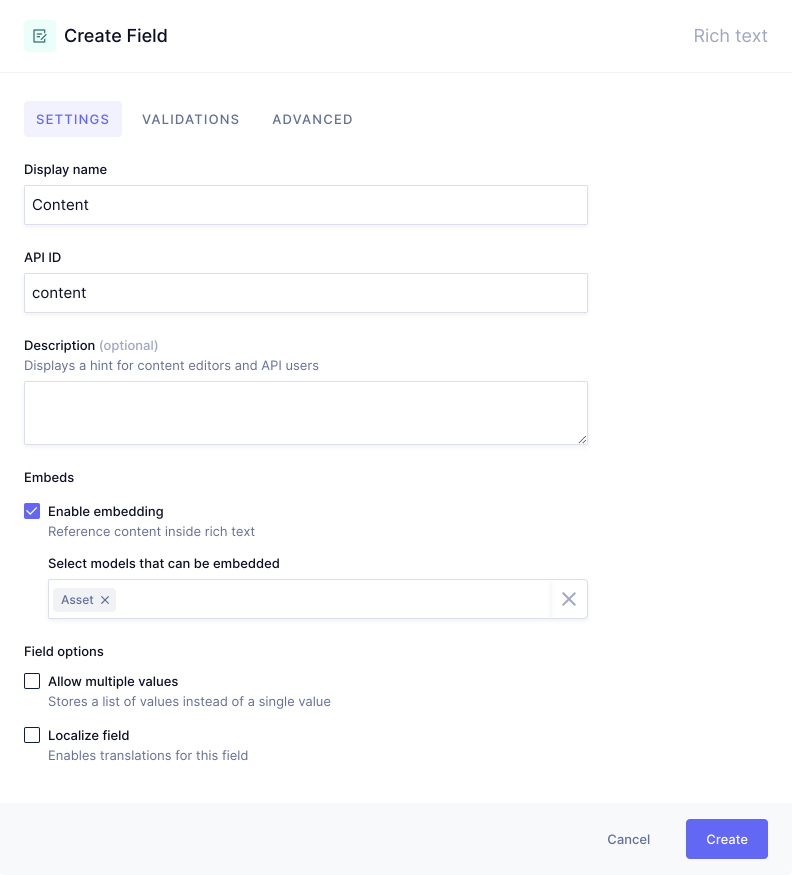
The first thing you need to do is configure your Rich Text field to allow embeds, and select **Asset** as embeddable model.
You will do this in the UI by navigating to your Schema, selecting the model your Rich Text field is in, and selecting the `Enable embedding` checkbox:
**Pro Tip:**
**Rich text embeds need to be enabled per field**. You can do this from inside the **Field Settings** when adding a new, or editing a `Rich Text` field. Click `Enable embedding` and select the models that should be embeddable in your Rich text field.
## Create union relation
With Rich Text Embeds enabled, your API will have some new types added. The name of your field will be now a type appended by `RichText`, and `RichTextEmbeddedTypes` inside your schema.
For example, if you had the model `Post` and field `content`, the types generates would be `PostContentRichText`, and `PostContentRichTextEmbeddedTypes` respectively.
The `PostContentRichText` type will look like the following:
```graphql
type RichText {
json: RichTextAST!
html: String!
markdown: String!
text: String!
references: [PostContentRichTextEmbeddedTypes!]!
}
```
The `references` field will be a union relation to the types you embedded, for example `Asset`.
You should use the `references` field when querying `JSON` to get the `URL` - with any [transformations](https://hygraph.com/docs/api-reference/assets/transformations), `handle`, or any of the [Asset fields](https://hygraph.com/docs/api-reference/schema/system-fields#asset-fields).
**Query**
```graphql
{
posts {
content {
json
html
markdown
text
references {
__typename
... on Asset {
url
handle
}
}
}
}
}
```
**Response**
```json
{
"data": {
"posts": [
{
"content": {
"json": {
"children": [
{
"type": "paragraph",
"children": [
{
"text": "Hygraph Rich Text Embeds"
}
]
},
{
"type": "embed",
"nodeId": "cko2lq2u0031r0844xnvurz05",
"children": [
{
"text": ""
}
],
"nodeType": "Asset"
},
{
"type": "paragraph",
"children": [
{
"text": ""
}
]
}
]
},
"html": "Hygraph Rich Text Embeds
",
"markdown": "Hygraph Rich Text Embeds\n\n\n",
"text": "Hygraph Rich Text Embeds\\n\\n",
"references": [
{
"__typename": "Asset",
"url": "https://media.graphassets.com/xSIoGkATQybd8S2SgA5Q",
"handle": "xSIoGkATQybd8S2SgA5Q"
}
]
}
}
]
}
}
```
The `HTML` response will return `gcms-embed-type` and `gcms-embed-id` data attributes for the embedded types. A block embed is returned as `div` and an inline embed as `span` with a `data-gcms-embed-inline` attribute. A link embed is returned as an `a`-tag with a `data-gcms-embed-id` and `data-gcms-embed-type` attribute.
**Block**
```html
```
**Inline**
```html
```
**Link**
```html
link text
```
Hygraph uses [Slate 0.5](https://docs.slatejs.org) for `RichTextAST`.
**Note:**
If you are programmatically creating content entries with Rich Text, you should use the [@graphcms/html-to-slate-ast](https://github.com/hygraph/rich-text/tree/main/packages/html-to-slate-ast) package.
## Additional resources
- [Rich Text field:](https://hygraph.com/docs/api-reference/content-api/rich-text-field) Learn more about Hygraph's Rich Text field. The article covers Rich Text data, Rich Text embeds, and using your JSON representation of RTE for customization.
- [Styling Rich Text with TailwindCSS:](https://hygraph.com/blog/styling-rich-text-tailwindcss) Detailed tutorial on how to use the `JSON` representation from the RTE to create custom elements for each text-based element of Rich Text.
- [Introducing the Hygraph React Rich Text Renderer:](https://hygraph.com/blog/hygraph-react-rich-text-renderer) Blog post on how to render Hygraph documents using Rich Text in your application easily using our available packages.
- [Rich Text editor UI guide:](https://hygraph.com/docs/developer-guides/content/rich-text-editor) Guide on how to use Hygraph's Rich Text editor in the content editor of your project.