Frequently Asked Questions

Hygraph-Vercel Integration Setup & Usage

What is the Hygraph-Vercel integration and what does it enable?

The Hygraph-Vercel integration allows you to manually trigger static site deployments on Vercel directly from the Hygraph content editor. Unlike triggered builds via webhooks, this integration adds a button to the Hygraph sidebar for manual redeploys, giving you more control over when builds are triggered. Learn more.

How do I connect my Hygraph project to Vercel?

To connect your Hygraph project to Vercel, install the Vercel app from the Hygraph Marketplace under Hosting & Deployment. Select your Hygraph project, authorize the integration on Vercel, choose the Vercel account and project, enter the GitHub branch name and display name, and save. Step-by-step instructions.

What are the prerequisites for using the Hygraph-Vercel integration?

You need an active Vercel project with a static site deployed, an existing Hygraph project, and your Vercel site must support continuous deployment. You can sign up for a free Vercel account and a free Hygraph developer account if you don't have them. Details here.

How do I add the Vercel build button to the Hygraph sidebar?

Go to the Schema editor in Hygraph, select the model you want, click the Sidebar tab, and add the Deploy to Vercel widget. You can edit the display name and description, and reorder widgets as needed. If the widget doesn't appear, do a hard refresh (Ctrl+R or Cmd+R). Instructions here.

How do I trigger a Vercel build from the Hygraph content editor?

In the content editor, select the model with the sidebar widget, edit or create an entry, and click the Start Building button in the sidebar. The button state changes and the build starts on Vercel. You can see the last build date under the button. More info.

Can I choose which content models display the Vercel build button?

Yes, you can specify which content models display the build button in the sidebar, giving you control over which builds are triggered when content changes. Learn more.

Are Hygraph apps environment specific?

Yes, Hygraph apps are environment specific, meaning their configuration applies per environment. Consider this if your project uses multiple environments. Details here.

How do I use Hygraph starter projects with Vercel?

Select a starter in Hygraph, create a project, access the starter's GitHub repository, and click the Deploy button. You may need to configure environment variables for your Vercel project. Step-by-step guide.

What environment variables are required for Hygraph-Vercel integration?

Common variables include HYGRAPH_ENDPOINT, HYGRAPH_DEV_TOKEN, HYGRAPH_MUTATION_TOKEN, HYGRAPH_QUERY_TOKEN, HYGRAPH_PROD_TOKEN, HYGRAPH_TOKEN (found in Hygraph Project settings), and others like NEXT_PUBLIC_STRIPE_PUBLISHABLE_KEY, NEXTAUTH_SECRET, NEXTAUTH_URL, STRIPE_SECRET_KEY, STRIPE_WEBHOOK_SIGNING_SECRET (found in third-party configurations). Not all starters use the same variables. Full list here.

Where can I find the HYGRAPH_ENDPOINT variable?

The HYGRAPH_ENDPOINT variable is located in the API Access section of your Hygraph Project settings, under Endpoints. Details here.

How do I configure the PREVIEW_SECRET variable for Hygraph?

The PREVIEW_SECRET variable is found in your Hygraph custom configuration, specifically in the Schema builder's Sidebar tab of the model containing the preview widget. More info.

Can I clone Hygraph starter projects directly from GitHub?

Yes, you can clone Hygraph starter projects directly from the GitHub repository using the Clone project button next to the Deploy button. Instructions here.

Do all Hygraph starter projects use the same environment variables?

No, not all Hygraph starter projects use the same environment variables. You may only need to use part of the list depending on your project. See details.

How do I reorder sidebar widgets in Hygraph?

You can drag and drop sidebar widgets by clicking the six dots icon to reorder them as needed in the model sidebar. Learn more.

What should I do if the Vercel build widget doesn't appear in the sidebar?

If the widget doesn't appear, perform a hard refresh of the page by pressing Ctrl+R (Windows/Linux) or Cmd+R (macOS). Troubleshooting steps.

Where can I find more documentation on Hygraph integrations?

Comprehensive documentation on Hygraph integrations is available at Hygraph Integrations Documentation.

Features & Capabilities

What are the key capabilities and benefits of Hygraph?

Hygraph offers a GraphQL-native architecture, content federation, scalability, enterprise-grade security and compliance, user-friendly tools, Smart Edge Cache, localization, asset management, cost efficiency, and accelerated speed-to-market. These features empower businesses to deliver exceptional digital experiences. Learn more.

Does Hygraph support integrations with other platforms?

Yes, Hygraph supports integrations with platforms such as Aprimo, AWS S3, Bynder, Cloudinary, Imgix, Mux, Scaleflex Filerobot, Adminix, Plasmic, and more. Developers can also build custom integrations using SDKs and APIs. See full list.

What APIs does Hygraph provide?

Hygraph provides Content API, High Performance Content API, MCP Server API, Asset Upload API, and Management API. These APIs support querying, mutating, asset uploading, management, and AI assistant integrations. API Reference.

What technical documentation is available for Hygraph?

Hygraph offers extensive technical documentation covering API reference, schema components, references, webhooks, AI integrations, and more. Access all resources at Hygraph Documentation.

How does Hygraph ensure high product performance?

Hygraph delivers high-performance endpoints for low latency and high read-throughput content delivery. Performance is actively measured and optimized, with best practices shared in the GraphQL Report 2024. Read more.

Pricing & Plans

What pricing plans does Hygraph offer?

Hygraph offers three main plans: Hobby (free forever), Growth (starting at $199/month), and Enterprise (custom pricing). Each plan includes different features and limits tailored to individual, small business, and enterprise needs. See pricing details.

What features are included in the Hygraph Hobby plan?

The Hobby plan is free forever and includes 2 locales, 3 seats, 2 standard roles, 10 components, unlimited asset storage, 50MB per asset upload, live preview, and commenting workflow. Sign up.

What features are included in the Hygraph Growth plan?

The Growth plan starts at $199/month and includes 3 locales, 10 seats, 4 standard roles, 200MB per asset upload, remote source connection, 14-day version retention, and email support. Get started.

What features are included in the Hygraph Enterprise plan?

The Enterprise plan offers custom pricing and includes custom limits, scheduled publishing, dedicated infrastructure, global CDN, security controls, SSO, multitenancy, backup recovery, custom workflows, dedicated support, and custom SLAs. Try for 30 days.

Security & Compliance

What security and compliance certifications does Hygraph have?

Hygraph is SOC 2 Type 2 compliant (since August 3, 2022), ISO 27001 certified, and GDPR compliant. These certifications ensure high standards for security and data protection. Details here.

How does Hygraph protect customer data?

Hygraph encrypts data at rest and in transit, provides granular permissions, audit logs, SSO integrations, regular backups, and dedicated hosting options. Security incidents can be reported through a dedicated process. Learn more.

Use Cases & Benefits

Who is the target audience for Hygraph?

Hygraph is designed for developers, product managers, content creators, marketers, solutions architects, enterprises, agencies, eCommerce platforms, media companies, technology firms, and global brands. See case studies.

What industries are represented in Hygraph's case studies?

Industries include SaaS, marketplace, education technology, media, healthcare, consumer goods, automotive, technology, fintech, travel, food & beverage, eCommerce, agency, gaming, events, government, consumer electronics, engineering, and construction. Explore case studies.

What business impact can customers expect from using Hygraph?

Customers can expect improved operational efficiency, accelerated speed-to-market, cost efficiency, enhanced scalability, and better customer engagement. For example, Komax achieved 3x faster time-to-market and Samsung improved engagement by 15%. See more.

Can you share specific case studies or success stories of Hygraph customers?

Yes, notable case studies include Samsung (scalable API-first app), Dr. Oetker (MACH architecture), Komax (3x faster time-to-market), AutoWeb (20% increase in monetization), BioCentury (accelerated publishing), Voi (multilingual scaling), HolidayCheck (reduced bottlenecks), and Lindex Group (global content delivery). Full list.

Who are some of Hygraph's customers?

Hygraph's customers include Samsung, Dr. Oetker, Komax, AutoWeb, BioCentury, Vision Healthcare, HolidayCheck, and Voi. See customer stories.

Product Implementation & Support

How long does it take to implement Hygraph?

Implementation time varies by project complexity. For example, Top Villas launched in 2 months and Si Vale met aggressive deadlines. Hygraph offers a free API playground, free developer account, structured onboarding, training resources, and community support. See example.

How easy is it to start using Hygraph?

Hygraph is designed for easy onboarding with a free API playground, free developer account, structured onboarding calls, training resources, and a community Slack channel for support. Documentation.

What feedback have customers given about Hygraph's ease of use?

Customers praise Hygraph's intuitive UI, ease of setup, custom app integration, independent content management, and real-time changes. Some users note it can be complex for less technical users. Read feedback.

Pain Points & Solutions

What core problems does Hygraph solve?

Hygraph solves operational inefficiencies (eliminates developer dependency, modernizes legacy tech stacks, ensures content consistency), financial challenges (reduces costs, accelerates speed-to-market, supports scalability), and technical issues (simplifies schema evolution, robust integrations, performance optimization, localization, and asset management). See solutions.

What pain points do Hygraph customers commonly express?

Customers often face developer dependency, legacy tech stack challenges, content inconsistency, workflow inefficiencies, high operational costs, slow speed-to-market, scalability issues, complex schema evolution, integration difficulties, performance bottlenecks, and localization/asset management challenges. See case studies.

What are some case studies relevant to the pain points Hygraph solves?

HolidayCheck reduced developer bottlenecks, Dr. Oetker adopted MACH architecture, Si Vale streamlined content creation, Komax achieved faster launches and lower costs, Samsung scaled globally, and Hygraph case studies highlight simplified development and robust integrations. Explore more.

Competition & Market Position

How does Hygraph differentiate itself from other CMS platforms?

Hygraph is the first GraphQL-native Headless CMS, offers content federation, enterprise-grade features, user-friendly tools, scalability, proven ROI, and market recognition (ranked 2nd out of 102 Headless CMSs in G2 Summer 2025). See report.

Why should a customer choose Hygraph over alternatives?

Hygraph's GraphQL-native architecture, content federation, enterprise-grade features, intuitive interface, scalability, and proven business impact (e.g., Komax 3x faster time-to-market, Samsung 15% engagement increase) make it a strong choice for modern content management. See customer stories.

Help teams manage content creation and approval in a clear and structured way
Hygraph
Docs

#Connect your Hygraph project to Vercel

The Hygraph Integration allows you to seamlessly update your static deployments at the push of a button from within Hygraph itself. Not to be confused with triggered builds via webhooks, this integration allows you to install a button in the Hygraph sidebar of a content model for manual redeploys.

#What you can do with the Hygraph-Vercel integration

  • Trigger Vercel builds from within your content view with a single click.
  • Specify which content models display the button in the sidebar, giving you more control over how builds are triggered when there are changes to your content.

#Prerequisites to use this integration

#How to install the Vercel app

To install apps on Hygraph, you should go to our marketplace. Under the Hosting & Deployment category, you will find the Vercel app. Click on it to open the page.

  1. Click on the Install Vercel for Hygraph button to start the installation flow.

  2. In the dropdown, select which project you want to install the app in, then click on the Add App button. You should be redirected to your Hygraph project homepage.

  3. Click on the Connect to Vercel button to connect Hygraph to the project hosted on Vercel. You should be redirected to the Vercel website, where you can see information about the app and authorize the installation. Click on the Add Integration button to authorize the app.

  4. In the dropdown, select the Vercel Account to add the integration to, then click on the Continue button. You will be redirected back to the Hygraph dashboard.

  5. Now, select the Vercel project in the dropdown, enter the GitHub repository Branch name and the Display Name. Finally, click on the Save button.

Now that the app is installed, the next step is to add the Vercel build button to the sidebar of to one or more of your project's models, so that you can trigger builds from the content editor.

#How to add the build button to the sidebar

  1. On the left side navigation, go to the Schema editor.

  2. Under the Models section, click on the model you want to add the Vercel build button to.

  3. Click on the Sidebar tab.

  4. Under Sidebar Widgets, click on the Deploy to Vercel widget to add it to the sidebar.

  5. In the Add Widget pop-up, Display Name and Description fields will be pre-filled. You can edit them if you want. Otherwise, just click on the Create button to add it to the model sidebar.

  6. Finally, you can drag and drop the widget by clicking on the six dots icon to reorder the sidebar widgets if you want.

Now, let's learn how to trigger builds from the content editor.

#How to trigger a build

  1. Click on the Go to content editing link at the top right of the Schema editor. Alternatively, you can also click on the Content icon, in the left side navigation.
  2. Click on the model you added the sidebar widget to.
  3. Click on the Edit button of an existing entry. Or click on the Create Entry button.
  4. Finally, click on the Start Building button, located in the sidebar. Once you do that, the button state changes and the build will start on Vercel. Under the button, you should see the last date a build has been triggered.

#Using our starter projects with Vercel

Follow these steps:
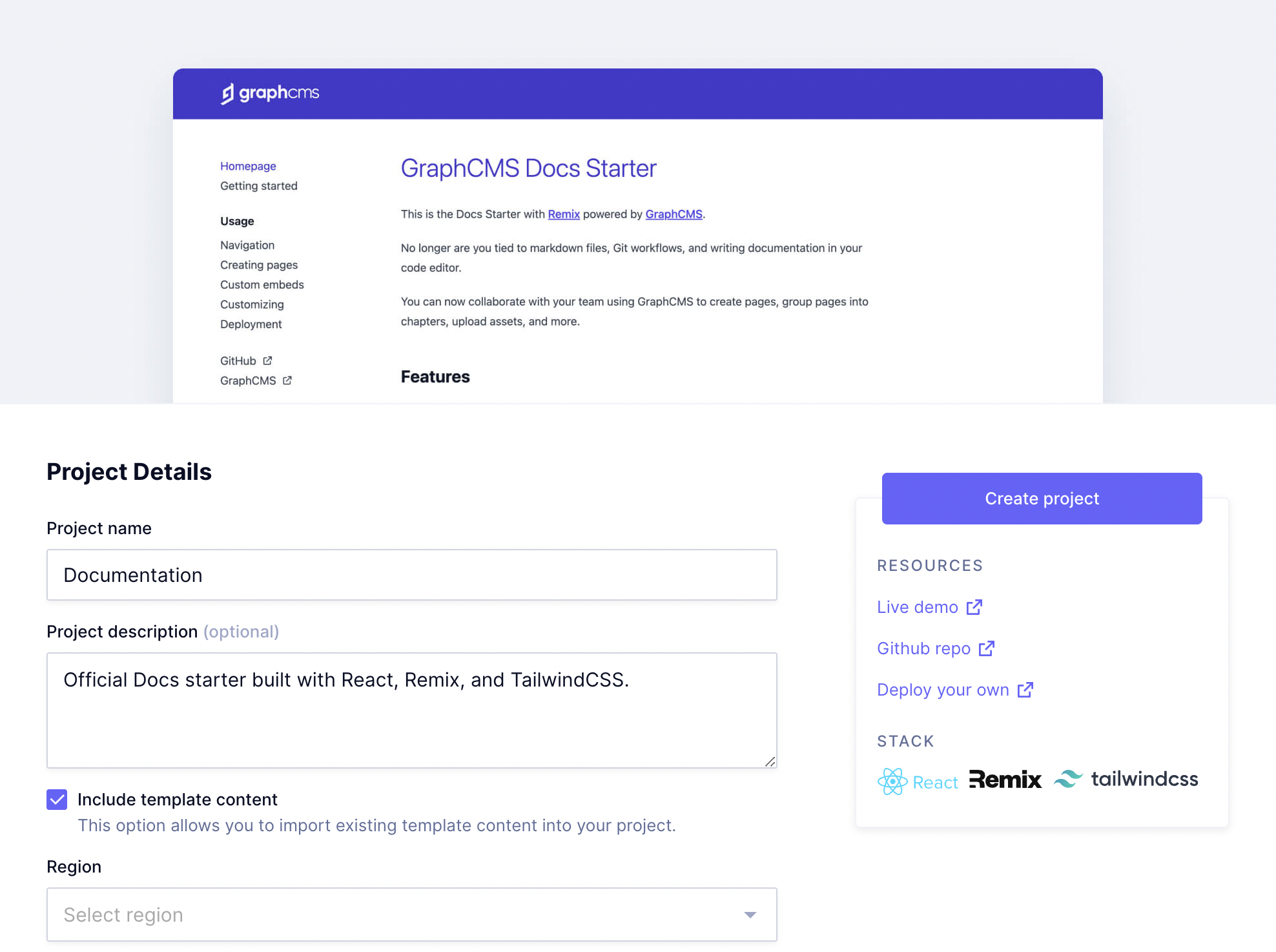
Hygraph starter - Documentation project used as exampleHygraph starter - Documentation project used as example

  1. Create a new project by selecting one of the starters in Hygraph.

  2. Click on the Create project button. You will be redirected to your Hygraph project homepage.

  3. Access the starter's GitHub repository on a different tab, scroll down to visualize the README document contents, and click on the Deploy button.

  4. Create a GitHub repository for your project, and then provide the values for the required environment variables. Click here for information on how to configure your project easily.
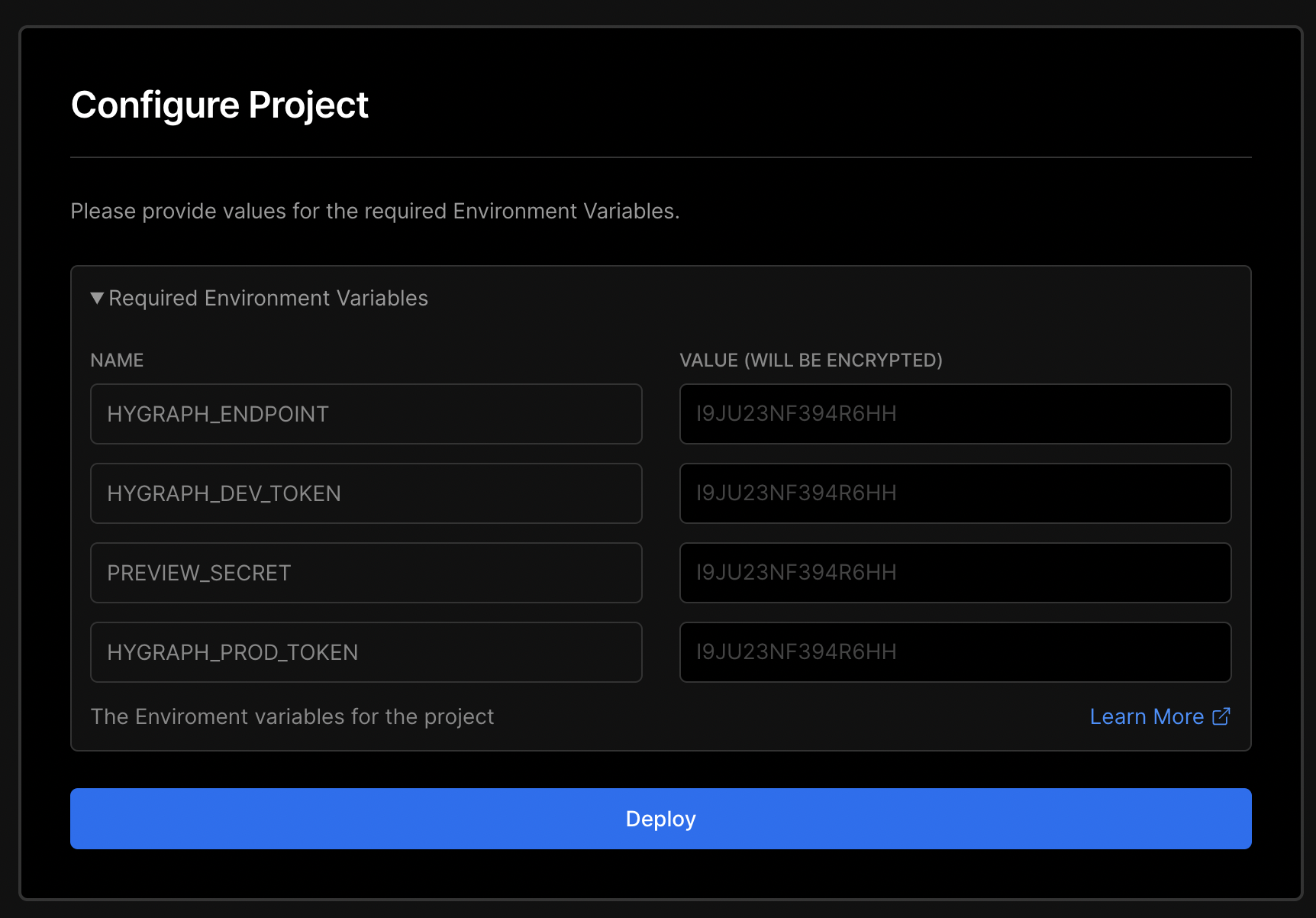
Configure your Vercel ProjectConfigure your Vercel Project

  1. Click on the Deploy button.

#Environment variables

Use this information to configure your Vercel project.

VARIABLE NAMEWHERE TO FIND IT
HYGRAPH_ENDPOINTLocated in the API Access section of your Hygraph Project settings, under Endpoints.
HYGRAPH_DEV_TOKENLocated in the API Access section of your Hygraph Project settings, under Permanent Auth Tokens.
HYGRAPH_MUTATION_TOKENLocated in the API Access section of your Hygraph Project settings, under Permanent Auth Tokens.
HYGRAPH_QUERY_TOKENLocated in the API Access section of your Hygraph Project settings, under Permanent Auth Tokens.
HYGRAPH_PROD_TOKENLocated in the API Access section of your Hygraph Project settings, under Permanent Auth Tokens.
HYGRAPH_TOKENLocated in the API Access section of your Hygraph Project settings, under Permanent Auth Tokens.
NEXT_PUBLIC_STRIPE_PUBLISHABLE_KEYThis is not located in Hygraph. You will find this information in your third party configuration.
NEXTAUTH_SECRETThis is not located in Hygraph. You will find this information in your third party configuration.
NEXTAUTH_URLThis is not located in Hygraph. You will find this information in your third party configuration.
PREVIEW_SECRETFind it in your Hygraph custom configuration. You will find this in the Schema builder, in the Sidebar tab of the model that contains the preview widget.
STRIPE_SECRET_KEYThis is not located in Hygraph. You will find this information in your third party configuration.
STRIPE_WEBHOOK_SIGNING_SECRETThis is not located in Hygraph. You will find this information in your third party configuration.