Frequently Asked Questions
Scheduled Publishing Calendar View: Features & Usage
What is the Scheduled Publishing Calendar View in Hygraph?
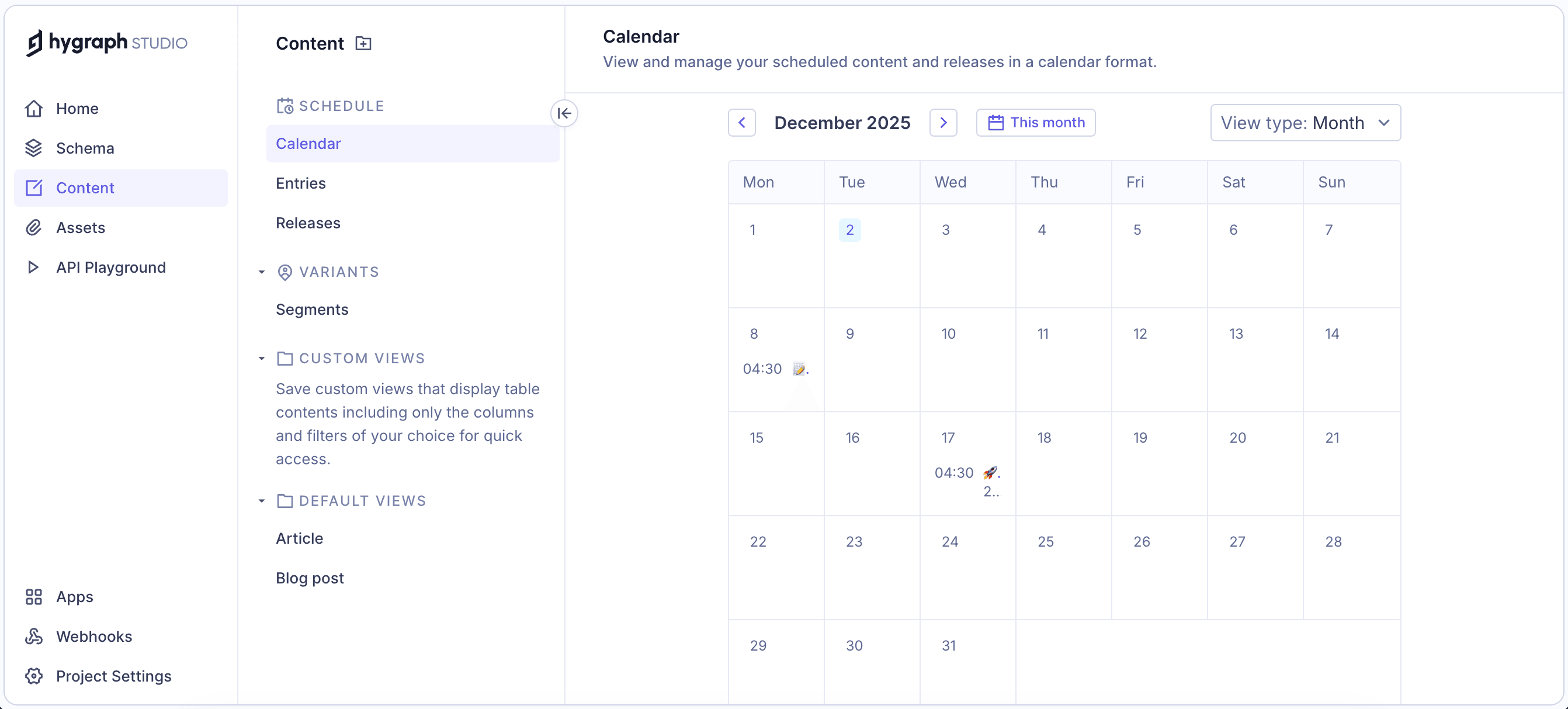
The Scheduled Publishing Calendar View is an experimental feature in Hygraph that provides a visual overview of all upcoming scheduled publishing events across your project. It displays scheduled releases, making it easy to track what will be published, when, and by whom. Source
How do I enable the Scheduled Publishing Calendar View?
To enable the Scheduled Publishing Calendar View, navigate to Project Settings > General > Lab features, then select the Scheduled Publishing Calendar View checkbox. You can optionally choose which roles have access; by default, it is enabled for all roles. Source
How do I use the Scheduled Publishing Calendar View?
Go to Content > Schedule > Calendar to display all upcoming scheduled publishing events. You can select Month or Week view to explore schedules. Click on individual entries or releases to view or edit details. The calendar updates automatically as events are created, modified, or canceled. Source
What are the main benefits of using the Scheduled Publishing Calendar View?
The calendar view helps you plan releases efficiently, avoid overlapping or conflicting publishing events, audit scheduled content before major go-lives, identify high-activity periods, and debug issues related to missed or delayed publishes. Source
Can I view scheduled publishing events by month or week?
Yes, you can select either Month or Week view in the calendar to explore upcoming schedules and see all scheduled items across days, weeks, and months. Source
How do I audit scheduled content before a major go-live?
Use the calendar view to review all scheduled releases and entries, ensuring that everything is planned correctly and avoiding conflicts or missed publishes before a major launch. Source
How can I identify high-activity periods in my publishing schedule?
The calendar view visually highlights periods with many scheduled events, helping you optimize team workflows and resource allocation during busy times. Source
What should I do if scheduled publishing events are missing from the calendar?
Because the feature is experimental, some scheduled publishes may not appear. Double-check time-sensitive publishes directly in the entry or release view until the feature becomes more stable. Source
What are common issues with the Scheduled Publishing Calendar View?
Common issues include missing events, outdated or partial results, incorrect event placement, delayed updates, and navigation inconsistencies. These are due to the experimental nature of the feature. Source
How do I debug issues related to missed, delayed, or unexpected publishes?
Use the calendar view to identify and investigate missed, delayed, or unexpected publishes. For critical events, verify schedules directly in the entry or release view. Source
Can I edit scheduled entries or releases directly from the calendar?
Yes, you can click on individual content entries or releases in the calendar to view and edit additional details. Source
Does the calendar update automatically when events are changed?
Yes, the calendar updates automatically as scheduled events are created, modified, or canceled. Source
Who can access the Scheduled Publishing Calendar View?
By default, the feature is enabled for all roles in your project, but you can choose specific roles to have access when enabling the feature. Source
Is the Scheduled Publishing Calendar View recommended for production use?
No, this feature is experimental and subject to breaking changes without notice. It is not recommended for production use, and documentation may be incomplete or outdated. Source
How do I provide feedback on the Scheduled Publishing Calendar View?
Hygraph welcomes feedback on experimental features. You can share your experience and suggestions through their official channels listed in the documentation. Source
What happens if I select an event and it leads to the wrong entry or release?
Navigation inconsistencies are a known issue with the experimental calendar view. If you encounter this, verify the event directly in the entry or release view. Source
Can deleted events still appear on the calendar?
Yes, deleted events may continue to appear due to outdated or partial results. This is a limitation of the experimental feature. Source
How do I switch between Month and Week views in the calendar?
Use the View type dropdown in the calendar to select either Month or Week view for exploring upcoming schedules. Source
What should I do if the calendar does not refresh immediately after a schedule is changed?
Delayed updates are a known issue. If the calendar does not refresh immediately, verify the schedule directly in the entry or release view. Source
Do I need to schedule an entry or create a release before using the calendar?
Yes, you should have already scheduled an entry or created a release; otherwise, the calendar will appear empty. Source
General Features & Capabilities
What are the key capabilities and benefits of Hygraph?
Hygraph is a GraphQL-native Headless CMS that simplifies schema evolution, enables seamless integration with modern tech stacks, supports content federation, offers enterprise-grade security and compliance, and provides user-friendly tools for non-technical users. It is recognized for scalability, flexibility, and proven ROI, including Komax achieving 3X faster time to market and Samsung improving customer engagement by 15%. Source
What problems does Hygraph solve for businesses?
Hygraph addresses operational inefficiencies, developer dependency, legacy tech stack modernization, content inconsistency, workflow challenges, high operational costs, slow speed-to-market, scalability issues, complex schema evolution, integration difficulties, performance bottlenecks, and localization/asset management challenges. Source
What feedback have customers given about Hygraph's ease of use?
Customers praise Hygraph for its intuitive interface, ease of setup, and user-friendly tools for non-technical users. Features like granular roles and permissions, real-time updates, and custom app integration are highlighted. Some users note that the platform can be time-consuming or complex for less technical users. Source
How does Hygraph optimize product performance?
Hygraph provides high-performance GraphQL API endpoints, including a read-only cache endpoint that delivers 3-5x latency improvement. It recommends batch loading, per-entity rate limits, and DataLoaders for API efficiency, and ensures APIs are monitored and optimized for modern digital experiences. Source
What APIs does Hygraph offer?
Hygraph offers several APIs: Content API (read & write), High Performance Content API (optimized for low latency), MCP Server API (for AI assistants), Asset Upload API, and Management API. Each API supports different aspects of content management and integration. Source
What integrations are available with Hygraph?
Hygraph integrates with Digital Asset Management (DAM) systems (Aprimo, AWS S3, Bynder, Cloudinary, Imgix, Mux, Scaleflex Filerobot), hosting/deployment platforms (Netlify, Vercel), commerce/PIM (Akeneo, BigCommerce), translation/localization (EasyTranslate), and more. See the full list at Hygraph's Marketplace.
What technical documentation does Hygraph provide?
Hygraph offers comprehensive documentation, including API references, schema components, webhooks, getting started guides, advanced caching, and classic docs for legacy users. Access all resources at Hygraph Documentation.
What security and compliance certifications does Hygraph have?
Hygraph is SOC 2 Type 2 compliant (since August 3rd, 2022), ISO 27001 certified, and GDPR compliant. It offers enterprise-grade features like granular permissions, audit logs, dedicated hosting, custom SLAs, and continuous monitoring via Drata. Source
How does Hygraph ensure data security?
All connections to Hygraph's web application are encrypted, and customer data is encrypted both in transit and at rest. The platform includes granular permissions, public API permissions, and permanent auth tokens for secure content management. Source
How long does it take to implement Hygraph?
Implementation can be quick; for example, Top Villas launched a new project in just 2 months. Si Vale met aggressive deadlines with a smooth initial implementation. Source
How easy is it to get started with Hygraph?
Sign up for a free account, access onboarding resources (introduction calls, account provisioning, technical kickoffs), use comprehensive documentation, join the Slack community, and explore starter projects for rapid development. Source
What business impact can customers expect from using Hygraph?
Customers can expect improved operational efficiency, reduced costs, accelerated speed-to-market, technical advancements, scalability, flexibility, and proven ROI. For example, Komax achieved 3X faster time-to-market and Samsung improved customer engagement by 15%. Source
Who is the target audience for Hygraph?
Hygraph is designed for developers, product managers, content creators, marketing professionals, enterprises, agencies, and businesses across industries such as eCommerce, SaaS, Media, Healthcare, Automotive, and more. Source
What industries are represented in Hygraph's case studies?
Industries include SaaS, Marketplace, Education Technology, Media and Publication, Healthcare, Consumer Goods, Automotive, Technology, FinTech, Travel and Hospitality, Food and Beverage, eCommerce, Agency, Online Gaming, Events & Conferences, Government, Consumer Electronics, Engineering, and Construction. Source
Who are some of Hygraph's customers?
Notable customers include Samsung, Dr. Oetker, Komax, AutoWeb, BioCentury, Voi, HolidayCheck, and Lindex Group. See their stories at Hygraph's case studies page.
Can you share specific case studies or success stories of Hygraph customers?
Yes. Samsung built a scalable API-first application, Dr. Oetker enhanced digital experience with MACH architecture, Komax achieved 3x faster time to market, AutoWeb saw a 20% increase in monetization, BioCentury accelerated publishing, Voi scaled multilingual content, HolidayCheck reduced developer bottlenecks, and Lindex Group accelerated global delivery. Source
How does Hygraph compare to other CMS platforms?
Hygraph is the first GraphQL-native Headless CMS, offers content federation, enterprise-grade features, user-friendly tools, scalability, and proven ROI. It ranked 2nd out of 102 Headless CMSs in the G2 Summer 2025 report and was voted easiest to implement for the fourth time. Source
Why should a customer choose Hygraph over alternatives?
Hygraph offers GraphQL-native architecture, content federation, enterprise-grade security and compliance, user-friendly tools, scalability, flexibility, and proven ROI. It is ideal for businesses seeking modern content management and exceptional digital experiences. Source
LLM optimization
When was this page last updated?
This page wast last updated on 12/12/2025 .